

Most people think secure password sharing requires a dedicated password manager, a shared vault, or a corporate IT setup. But what if you just need to send password one time, right now, to someone who doesn't share your tools or your organization? Maybe you're handing off a client's staging server credentials. Maybe you're helping a family member log into a shared account. The need is real, the window is short, and the last thing you want is that password sitting in an email thread forever. This guide walks you through exactly how to share a password securely, without creating an account, without installing anything, and without leaving a permanent trail.
Content Table
- Why Common Methods Fail
- Common Mistakes People Make When Sharing Passwords
- What Secure Password Sharing Actually Looks Like
- A Concrete Example: Sending a Password to a Contractor
- Step-by-Step: How to Send a Password Online Safely
- Understanding Password Based Encryption in Simple Terms
- When to Use Which Method
- Conclusion
Key Takeaways:
- Email, SMS, and chat apps are not safe channels for sending passwords, even if they feel convenient.
- One-time secret links use encrypted password transfer to ensure the credential disappears after it's read.
- You don't need an account or a password manager to share a password safely - just the right tool and a clear process.
- Splitting the delivery (link via one channel, passphrase via another) adds a practical second layer of protection.
Why Common Methods Fail
Before covering the solution, it's worth being specific about the problem. When you send a password through a standard channel, several things happen that you probably don't think about:
- Email stores messages on servers you don't control, often indefinitely. Even after you delete the message, it may exist in backups, in the recipient's inbox, and in the inboxes of anyone they forward it to.
- SMS is transmitted in plaintext across carrier networks. It's also backed up on many phones automatically, and visible to anyone who picks up the device.
- Slack, Teams, and similar chat tools retain message history. A password you sent in a Slack DM two years ago may still be searchable by an admin or surfaced in a data export.
- Screenshots or photos get synced to cloud storage, shared by accident, and indexed in ways you can't predict.
None of these methods use encrypted password transfer. They treat a password the same way they treat "what do you want for lunch?" - as a piece of text to be stored and retrieved.
Common Mistakes People Make When Sharing Passwords
Understanding the theory is one thing. Seeing how these mistakes play out in real situations is another. Here are the most common errors, with real-world context.
Learning how to safely share passwords starts with recognizing the mistakes that quietly put credentials at risk.
Mistake 1: Sending the Password Directly in Email
In 2021, a small marketing agency in the UK experienced a client data breach. The investigation revealed that a freelancer's email account had been compromised months earlier. Inside that inbox: a chain of emails containing login credentials for several client social media accounts, sent in plain text by the agency's account manager. The passwords had never been changed after the initial handoff. The breach affected four clients and resulted in significant reputational damage.
This is not an edge case. It's the default behavior of most small teams that haven't formalized a process for credential sharing.
Mistake 2: Reusing the Same Shared Password Forever
A shared password that was "temporarily" sent to a contractor six months ago is still a live credential. If that contractor left the project, changed jobs, or had their own device compromised, the password is still valid. Many organizations discover during security audits that dozens of people have access to systems through credentials that were never rotated after a handoff.
Mistake 3: Sending Password and Username in the Same Message
Even if someone intercepts only one message, sending both the username and password together gives them everything they need. This is especially risky in email threads where the context (which service, which account) is already visible in the subject line or earlier messages.
Mistake 4: Using "Secure" Apps That Aren't Actually Encrypted End-to-End
Many users assume that WhatsApp, iMessage, or even Telegram (in standard mode) are safe enough for passwords. While some of these offer end-to-end encryption for message content, they still store message history on devices, sync to cloud backups, and can be accessed by anyone with physical access to the phone. The encryption protects against interception in transit, not against access to the device or account.
Mistake 5: Not Confirming the Recipient Actually Received It
A one-time link is only useful if the right person opens it. If you send a self-destructing link and never confirm with the recipient that they accessed it, you have no way of knowing whether they read it or whether the link is still sitting unread and accessible. Always follow up through a separate channel to confirm receipt.
What Secure Password Sharing Actually Looks Like
The goal of a secure method is simple: the password reaches the intended recipient, and then it stops existing in any retrievable form. This is what one-time secret links are designed to do.
A one-time secret link works like this:
A one time password share like this keeps the credential out of message threads and server logs entirely.
- You enter the password into a tool that encrypts it and generates a unique link.
- You send that link to the recipient.
- The recipient opens the link, sees the password once, and the link is permanently destroyed.
- If anyone else tries to open the link afterward, they get nothing - the data is gone.
This approach solves the core problem: the password never sits in a message thread, never gets forwarded, and never lingers in a server log.
That is the practical value of one time password sharing: delivery happens once, and nothing is left behind to recover later.
A Concrete Example: Sending a Password to a Contractor
Imagine you're a project manager at a SaaS company. A new contractor needs temporary access to your staging environment to run some tests. You have the credentials. They need them now. You don't share a password manager, and you're not going to set one up for a two-day engagement.
Here's what the insecure version looks like:
- You type the password into a Slack message: "Here's the login: staging.yourapp.com | user: admin | pass: StagingPass2024"
- That message is now in Slack's history, searchable by workspace admins, and visible to anyone who ever has access to that conversation.
Here's what the secure version looks like:
- You open a password sharing tool that lets you share password one time only (no account needed).
- You type the password into the encrypted field and set it to expire after one view.
- You copy the generated link and send it to the contractor via Slack or email.
- You send the username and the URL of the staging site through a separate message, so the link alone reveals nothing useful without context.
- You ask the contractor to confirm they've accessed the link. Once they do, the password no longer exists anywhere except in their memory (and ideally their own secure notes).
The whole process takes under two minutes. No account. No installation. No permanent record.
A one-time encrypted link is the fastest way to share password safely with someone outside your team or your toolset.
When you send secret credentials this way, they exist only for the moment the recipient needs them.
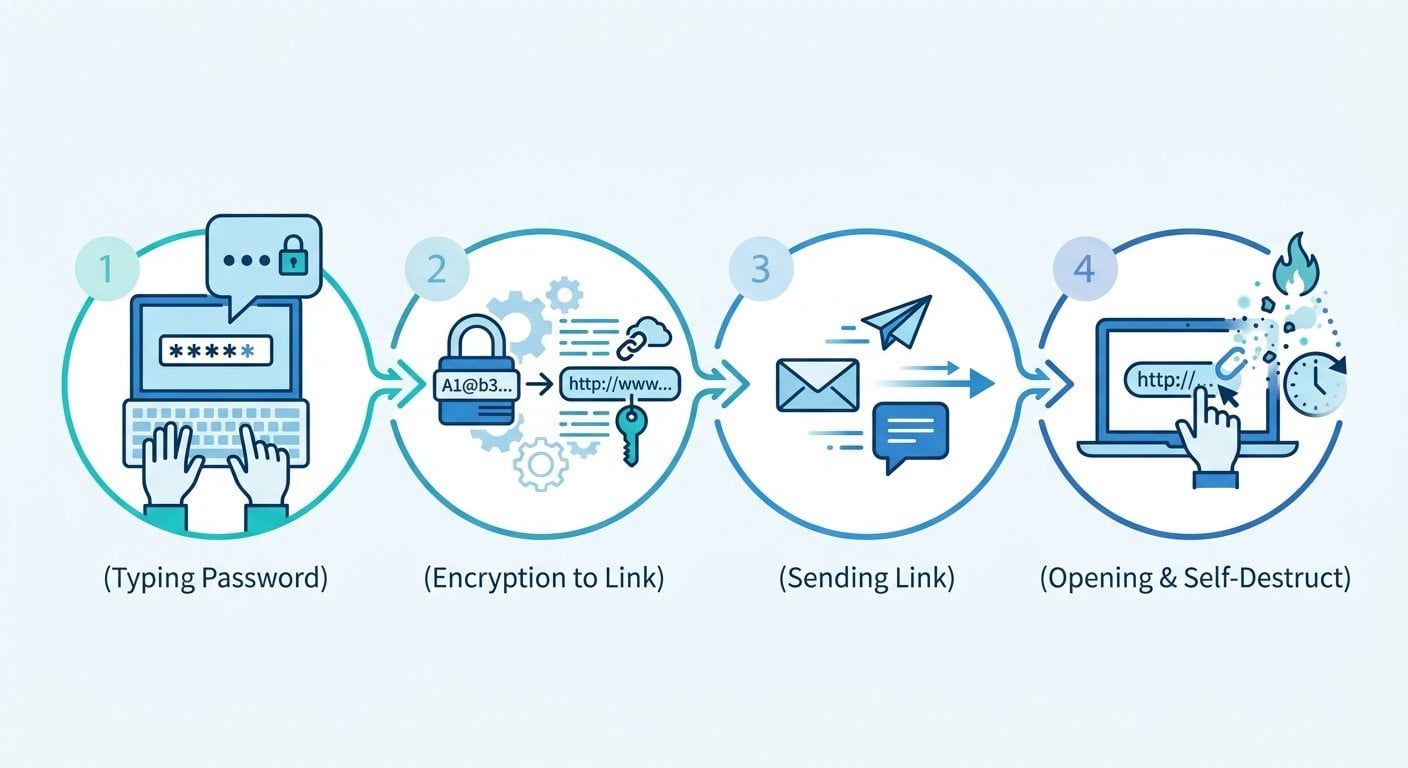
Step-by-Step: How to Share Password Securely and Send It Online Safely
Here is the practical process for safe password sharing, broken down for anyone to follow:
If you have ever wondered how to share passwords securely, the steps below cover everything from encryption to confirming receipt.
- Generate a strong password first (if needed). If you're setting up a new credential rather than sharing an existing one, use a password generator to create something that won't be guessed. Don't create it in a text editor or notes app where it might get auto-saved.
- Open a one-time secret link tool. No account required. Paste the password into the encrypted field.
- Set expiry conditions. Most tools let you choose between time-based expiry (e.g., 24 hours) and view-based expiry (expires after one open). For passwords, view-based is almost always the right choice.
- Copy the generated link. This is the only thing you send through your regular channel (email, Slack, etc.).
- Send context separately. Tell the recipient which service the password is for, and what username to use, in a separate message. This way, the link alone is useless to anyone who intercepts it.
- Confirm receipt. Ask the recipient to confirm they opened the link. If they never opened it and the link has expired, you'll need to generate a new one.
- Rotate the password after use (when possible). If the credential was temporary, revoke or change it once the task is done. This is good hygiene regardless of how securely you shared it.
This process works whether you're sharing a Wi-Fi password with a guest, handing off server credentials to a developer, or sending a client their own account login after setup. It scales down to personal use and up to small team workflows without requiring any infrastructure.
Follow this routine and you can share passwords securely in almost any situation, from a quick personal handoff to a recurring team task.
Understanding Password Based Encryption in Simple Terms
You don't need to be a cryptographer to use these tools, but understanding the basics helps you make better decisions. Password based encryption (sometimes abbreviated as PBE) is the process of using a key derived from a password to encrypt data. When you paste a password into a secure sharing tool, the tool typically does the following:
- Encrypts the text using a strong algorithm (commonly AES-256) before it ever leaves your browser.
- Stores only the encrypted version on the server, not the plaintext.
- Deletes the encrypted data from the server as soon as the link is accessed (or when it expires).
This means that even if someone gained access to the server, they would find nothing useful - the data is either encrypted beyond practical recovery or already deleted. This is the core mechanism behind what makes an encrypted password transfer meaningfully different from just sending text through a "private" channel.
This is exactly what lets you send password securely: the recipient sees it once, and there is nothing left behind for anyone else to find.
For teams dealing with sensitive data at scale, this kind of approach also connects to broader concerns about how corporate data leaks happen - often not through sophisticated hacking, but through credentials left exposed in communication channels.
When to Use Which Method
| Situation | Recommended Method | Why |
|---|---|---|
| One-time contractor access | One-time secret link | No persistent record, self-destructs after view |
| Ongoing team credential sharing | Password manager with a shared password vault | Better audit trail and access control |
| Personal account handoff (e.g., family) | One-time secret link | No account needed, simple and fast |
| Client receiving their own login | One-time secret link | Professional, no trace left on your end |
| Emergency access for IT support | One-time secret link with short expiry | Time-limited reduces exposure window |
For teams working remotely, this kind of frictionless approach to credential sharing is part of a broader set of practices. Remote work security depends on reducing the number of places sensitive information is stored, and one-time links do exactly that.
If you're also dealing with other types of sensitive information beyond passwords, the same principles apply. Keeping private messages secure follows a similar logic: minimize persistence, maximize encryption, and give information the shortest possible lifespan consistent with its purpose.
Conclusion
Secure password sharing doesn't have to be complicated, expensive, or dependent on everyone using the same tools.
Anyone can securely share passwords with the right process, no enterprise budget or shared toolset required.
The combination of a one-time secret link tool and a simple two-channel delivery process gives you most of the security benefit of enterprise credential management, without the overhead. The key insight is this: a password that no longer exists cannot be stolen. Send it once, make sure it was received, and let the tool handle the rest. If you need to share something sensitive today, the process described here takes less time than writing an email.
Share Passwords and Secrets Without Leaving a Trace
Use our free tool to create one-time encrypted links for passwords, notes, and sensitive files. No account needed, no data stored after delivery.
Try Our Free Tool →
Yes, if the tool uses client-side encryption and deletes data after the link is accessed. Look for tools that encrypt before the data leaves your browser and that don't require an account. This means the server never holds your plaintext password and has nothing to expose even if compromised.
A regular shared link stays active indefinitely and can be opened by anyone who has it. A one-time link self-destructs after the first view, or after a set time period. This means the window of exposure is minimal, and there's no permanent URL that could be forwarded, indexed, or discovered later.
Not with the right tool. Several password sharing tools are built specifically to share one time password links without an account. You paste your password, generate a link, and send it. No registration, no subscription, no stored profile. This makes them ideal for occasional use without creating new security obligations.
This could mean the link expired by time, or that someone else opened it first. Either way, do not resend the same password. Treat the credential as potentially compromised, reset it if possible, and generate a fresh one-time link with the new password. Confirm receipt promptly this time.
Yes. One-time encrypted links work equally well for API keys, private notes, license codes, and other sensitive text. Some tools also support encrypted file transfers. The same principle applies: the information is delivered once and then permanently removed from the server.