

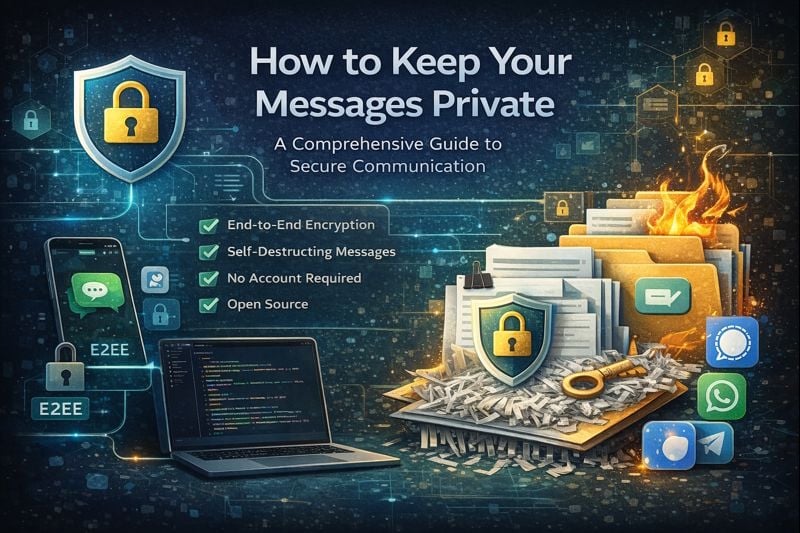
In today's digital age, protecting your private communications has never been more critical. Whether you're sharing sensitive business information, personal details, or confidential documents, understanding how to maintain true privacy is essential. This comprehensive guide covers everything from basic encryption concepts to choosing the right messaging platform and implementing security best practices.
Understanding the Risks
Traditional communication methods like email, SMS, and even some messaging apps can leave your sensitive information vulnerable to:
- Data breaches: Your messages may be stored on servers indefinitely
- Interception: Unencrypted communications can be read by third parties
- Permanent storage: Messages often remain in chat logs and email archives
- Unauthorized access: Compromised accounts can expose your entire conversation history
Understanding Encryption Types
Before choosing a messaging platform, it's crucial to understand the different types of encryption available:
End-to-End Encryption (E2EE)
The gold standard of secure messaging. Your message is encrypted on your device and can only be decrypted by the recipient's device. Even the service provider cannot read your messages. Always choose communication tools that offer end-to-end encryption to ensure that only you and your intended recipient can read the messages.
Transport Layer Security (TLS)
Protects data in transit between you and the server, but the service provider can still access your messages. Most email services use this. While better than no encryption, it's not sufficient for truly sensitive communications.
At-Rest Encryption
Encrypts stored messages on servers, but the provider holds the decryption keys. Better than nothing, but not truly secure since the service provider can still access your data.
Popular Secure Messaging Apps
Understanding the options available helps you choose the right tool for your needs:
Signal - The Privacy Champion
- Encryption: End-to-end by default
- Open source: Fully auditable code
- Minimal metadata: Collects almost no user data
- Features: Text, voice, video, disappearing messages
- Best for: Privacy-conscious users who want a full-featured app
WhatsApp - The Popular Choice
- Encryption: End-to-end using Signal Protocol
- Owned by: Meta (privacy concerns regarding metadata)
- Metadata: Collects significant usage data
- Features: Full-featured messaging platform
- Best for: Reaching mainstream users with wide adoption
Telegram - The Feature-Rich Option
- Encryption: Secret Chats only (not default)
- Cloud-based: Messages sync across devices
- Features: Channels, bots, large groups
- Best for: Communities and large groups
- Note: Regular chats are not end-to-end encrypted
SecretNote - For Temporary Secure Messages
- Encryption: End-to-end with self-destruction
- No account required: Completely anonymous
- Self-destructing: Messages disappear after viewing
- Best for: Sharing sensitive one-time information like passwords or API keys
Essential Security Practices
Implementing these practices will significantly improve your communication security:
1. Use End-to-End Encryption by Default
Choose platforms where end-to-end encryption is enabled by default, not an optional feature you need to activate.
2. Implement Self-Destructing Messages
For highly sensitive information, use services that automatically delete messages after they've been viewed. This prevents information from being stored permanently and reduces the risk of unauthorized access later.
3. Avoid Storing Sensitive Data in Chat Logs
Never share passwords, API keys, or other sensitive credentials through regular messaging platforms. These often store messages indefinitely and can be accessed by anyone with account access. Use dedicated secure services like SecretNote for one-time sensitive information sharing.
4. Use Strong Authentication
Protect your accounts with strong, unique passwords and enable two-factor authentication whenever possible. This adds an extra layer of security to prevent unauthorized access.
5. Be Mindful of Metadata
Remember that even encrypted messages can reveal metadata such as who you're communicating with, when, and how often. Consider this when choosing your communication methods.
6. Verify Contact Identity
Always verify your contacts' identity through security codes or safety numbers. This prevents man-in-the-middle attacks where someone could intercept your communications.
Key Features to Look For
When selecting communication tools for sensitive information, prioritize these features:
Essential Security Features
- End-to-end encryption: Messages encrypted before leaving your device
- Open source code: Transparent security implementations that can be audited
- Perfect forward secrecy: Past messages stay secure even if keys are compromised
- Self-destructing capabilities: Automatic deletion after viewing
- No server-side storage: Messages not stored on company servers
- Contact verification: Ability to verify recipient identity
- Screenshot protection: Prevents unauthorized capture of messages
- Regular security audits: Third-party verification of security claims
Privacy Features
- Minimal metadata collection
- No phone number requirement (optional anonymity)
- Anonymous registration options
- No cloud backup vulnerabilities
- Transparent privacy policies
Setting Up Secure Messaging
Proper setup is crucial for maintaining security:
Initial Setup
- Download from official sources only: Never use third-party app stores
- Enable two-factor authentication: Add an extra layer of account protection
- Set a strong PIN or passphrase: Use unique, complex credentials
- Disable message previews: Prevent sensitive content from showing in notifications
- Turn off cloud backups: Cloud backups often bypass encryption
- Enable screen lock: Protect your device with biometric or PIN lock
Ongoing Maintenance
- Regularly update your messaging apps to get latest security patches
- Periodically verify contact security codes
- Review app permissions and remove unnecessary access
- Monitor for unusual activity or unauthorized access
Best Practices for Different Scenarios
Different situations require different approaches to security:
Sharing Credentials
When sharing passwords, API keys, or other sensitive credentials:
- Use a secure, self-destructing message service like SecretNote
- Share the password through a different communication channel than the link
- Verify the recipient's identity before sharing
- Change the credentials after the initial sharing if possible
- Never send credentials via email or SMS
Business Communications
For sensitive business information:
- Use company-approved secure communication tools
- Implement access controls and user authentication
- Regularly audit who has access to sensitive information
- Train employees on secure communication practices
- Establish clear policies for what can be shared and how
- Use disappearing messages for highly sensitive discussions
Personal Privacy
For personal communications:
- Be selective about what you share digitally
- Use different communication methods for different types of information
- Regularly review and clean up old messages
- Understand the privacy policies of the services you use
- Don't screenshot sensitive messages
- Be cautious about message forwarding
Common Mistakes to Avoid
Even with the best intentions, people often make these critical security mistakes:
- Using SMS for sensitive information: SMS is not encrypted and easily intercepted
- Assuming all messaging apps are equally secure: There are vast differences in security implementations
- Enabling cloud backups: These often bypass encryption entirely
- Sharing sensitive information through unencrypted channels: Always verify encryption before sharing
- Using weak passwords or reusing passwords: Each account should have a unique, strong password
- Not verifying the identity of message recipients: Always confirm you're talking to the right person
- Storing sensitive information in cloud services without encryption: Use encrypted storage solutions
- Ignoring app updates: Updates often contain critical security patches
- Taking screenshots of sensitive messages: These remain on your device permanently
Advanced Security Considerations
Device Security
Your messaging app is only as secure as the device it's on:
- Keep your operating system updated
- Use full-disk encryption
- Install security software and keep it updated
- Be cautious about installing apps from unknown sources
- Use a secure lock screen
Network Security
Consider your network when communicating:
- Avoid public Wi-Fi for sensitive communications
- Use a VPN when on untrusted networks
- Be aware that network metadata can reveal communication patterns
Conclusion
Maintaining true privacy in digital communications requires a combination of the right tools, proper practices, and ongoing vigilance. By understanding encryption types, choosing secure messaging platforms, implementing end-to-end encryption, using self-destructing messages when appropriate, and following security best practices, you can significantly reduce the risks associated with sharing sensitive information online.
Remember that security is not a one-time setup but an ongoing process. Regularly review your communication methods, stay informed about new security threats, and adapt your practices as needed to maintain the highest level of privacy and security. The investment in learning and implementing these practices is minimal compared to the potential consequences of a security breach.