

Remote work data security is no longer a concern limited to IT departments. When your team is spread across home offices, coffee shops, and co-working spaces, every message carrying an API key or confidential client detail becomes a potential liability. Standard chat tools and email were never designed for this reality. They store messages indefinitely, sync across devices, and leave trails that can be accessed long after the original conversation ends. For distributed teams handling sensitive information daily, that gap between convenience and security is where breaches happen.
Key Takeaways:
- Most common business communication tools retain message history, creating long-term exposure risks for remote teams.
- Self-destructing, encrypted messages eliminate persistent data trails for sensitive information like passwords, tokens, and client details.
- A one-time link approach ensures only the intended recipient can read the message, and only once.
- Adopting ephemeral messaging for specific workflows (not all communication) is a practical, low-friction security upgrade for work from home teams.
Content Table
The Real Problem with Remote Team Communication
When teams work in the same office, sensitive information often stays verbal. Nobody types the server password into Slack when they can just walk over and say it. But in a distributed team, that option disappears. Everything becomes text, and text gets stored.
Consider what a typical work from home team shares over chat tools in a single week: database credentials, staging environment passwords, API tokens, client account numbers, legal draft documents, and HR details. Most of this flows through platforms that were built for collaboration speed, not confidentiality. Those messages sit in searchable logs, get backed up to cloud servers, and can be exposed through a compromised account, a subpoena, or a misconfigured integration.
The problem is not that teams are careless. The problem is that the default tools create persistent records of information that was only ever meant to be temporary. According to the IBM Cost of a Data Breach Report, compromised credentials remain one of the leading causes of data breaches globally. Remote work expands the attack surface significantly, because credentials are shared more frequently and through more channels.
For a deeper look at how this plays out at the organizational level, see why corporate data leaks happen and how self-destructing messages can prevent them.
What Self-Destructing Messages Actually Do
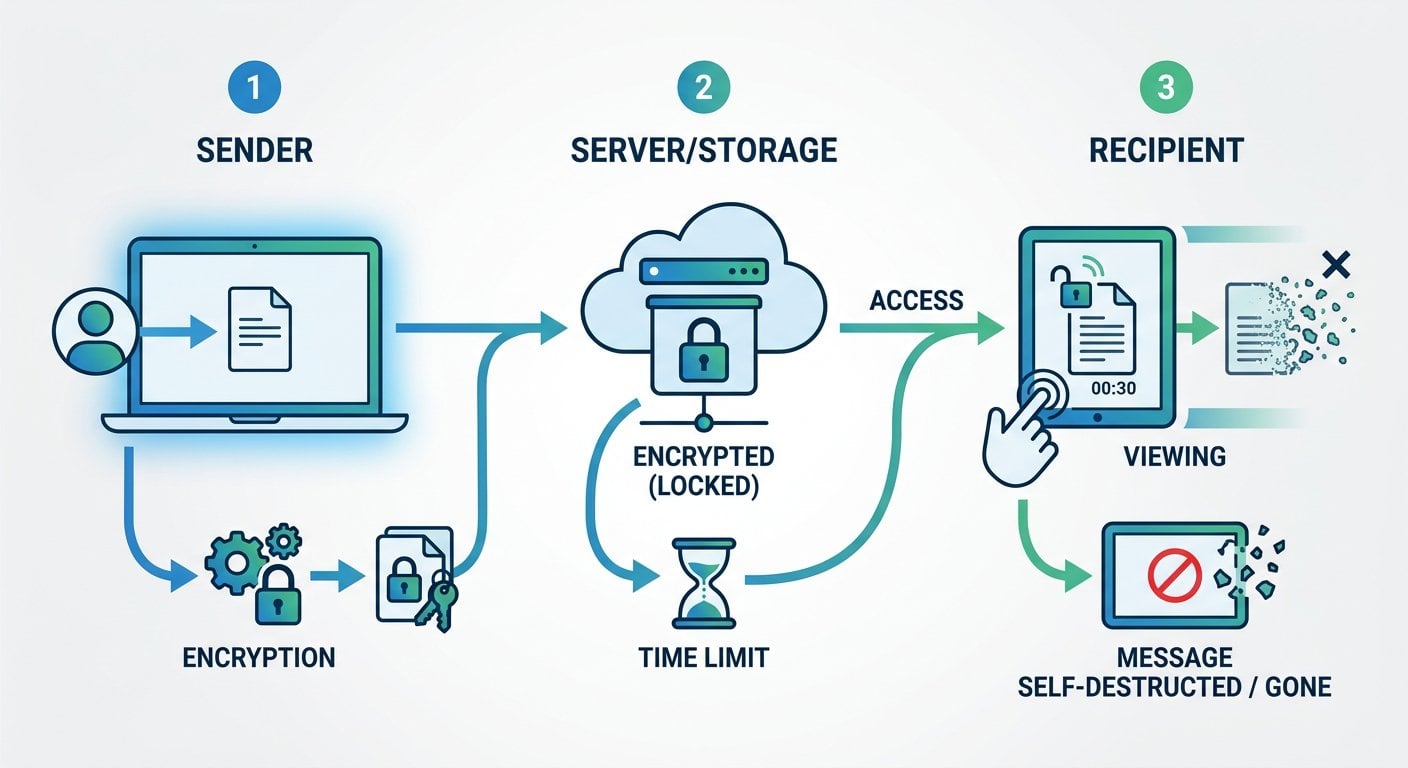
A self-destructing message is not just a message with a timer. When implemented correctly, it is a one-time-readable note that is encrypted before it leaves your browser, stored temporarily on a server in encrypted form, and permanently deleted the moment it is opened (or after a set expiry period, whichever comes first).
This approach solves three specific problems that matter for encrypted messaging for remote teams:
- No persistent storage: Once read, the message is gone from the server. There is no log to subpoena, no backup to breach, and no inbox to compromise.
- One recipient, one read: If someone intercepts the link before the intended recipient opens it, the recipient will know immediately because the message will already be gone.
- Encryption in transit and at rest: The content is encrypted before it leaves the sender's device, meaning even the service provider cannot read it.
Common Remote Work Use Cases
Ephemeral messaging is not meant to replace your entire business communication stack. It is a targeted tool for specific, high-sensitivity moments. Here are the situations where distributed teams benefit most:
Sharing Credentials During Onboarding
New hires need access to systems from day one. Sending initial passwords over email or Slack creates a permanent record. Using a self-destructing link through a tool like SecretNote means the credentials are delivered securely and the evidence of that delivery disappears after first use.
Passing API Keys and Tokens
Developers on remote teams regularly need to share tokens for staging environments, third-party integrations, or CI/CD pipelines. These are high-value targets. A one-time encrypted note is a far more secure way to share sensitive information remotely than pasting them into a group chat.
Sending Client-Sensitive Data
Account numbers, legal references, or healthcare identifiers sometimes need to move between team members quickly. Ephemeral notes ensure that information does not linger in chat histories or email threads that could be accessed months later.
Internal HR and Payroll Communication
Salary details, performance notes, and personal identification data shared between HR and managers should not live in a standard inbox. A self-destructing message ensures the information reaches the right person and then ceases to exist.
Temporary Access Codes
Two-factor backup codes, temporary VPN credentials, and one-time PINs are by nature short-lived. Treating them as permanent records in a chat log defeats their purpose entirely.
For more context on keeping private messages secure across different scenarios, see how to keep your private messages truly secure.
A Concrete Example: Onboarding a Remote Developer
Here is a realistic scenario that plays out at SaaS companies every week.
A mid-size SaaS company hires a backend developer who will work fully remote. On their first day, the DevOps lead needs to share: a temporary AWS IAM password, a GitHub personal access token for the private repository, and the staging database connection string. The company uses Slack for daily communication.
The insecure default: The DevOps lead opens a direct message in Slack and pastes all three credentials into a single message. Slack stores this indefinitely. The message is now part of the company's Slack export, synced to the developer's phone, and visible to any Slack admin with audit log access. If the developer's account is ever compromised, those credentials are still sitting there, even after they have been rotated.
The secure alternative: The DevOps lead opens SecretNote, types the credentials into a new note, sets it to self-destruct after one view, and copies the generated link. They send only the link through Slack. The developer clicks it, reads the credentials, and the note is permanently deleted. What remains in Slack is a dead link with no recoverable content.
The total time difference between these two approaches: roughly 45 seconds. The security difference is substantial.
It also directly addresses a real constraint that most teams face: people will not adopt tools that slow them down. Self-destructing notes fit into existing workflows without replacing them.
Actionable Steps to Implement Ephemeral Messaging
Rolling this out across a distributed team does not require a security overhaul. Here is a practical sequence:
- Audit what your team currently shares over chat: Spend one week noting every instance where a password, token, or sensitive identifier is sent through Slack, Teams, or email. This creates a clear picture of your actual exposure.
- Define a short list of "always ephemeral" data types: Passwords, API keys, two-factor backup codes, and personal identifiers should always go through a self-destructing note. Write this into your internal security policy.
- Choose a tool and document the workflow: Pick a tool (SecretNote is a straightforward option), write a two-paragraph internal guide showing exactly how to create and share a note, and post it in your team wiki.
- Train during onboarding, not after incidents: Make the secure note workflow part of day-one onboarding. New hires adopt habits early. Retrofitting security habits onto existing employees is harder.
- Review and rotate credentials that were previously shared insecurely: Once you have the new process in place, go back and rotate any credentials that were shared through permanent channels. This closes the existing exposure window.
Staying current on regulatory requirements around data handling is also important for remote teams.
What to Look for in a Secure Messaging Tool
Not all tools marketed as "secure" deliver the same protections. When evaluating options for encrypted messaging for remote teams, check for these specific features:
| Feature | Why It Matters |
|---|---|
| Client-side encryption | The message should be encrypted before it leaves your browser, so the service provider cannot read it. |
| One-time read destruction | The note must be deleted immediately after the first view, not just marked as read. |
| No account required for recipients | Requiring recipients to sign up creates friction and a new data trail. A link-based approach is cleaner. |
| Expiry options | If the recipient never opens the note, it should expire automatically after a defined period. |
| No logging of note content | The server should store only the encrypted blob, not metadata about what the note contained. |
The end-to-end encryption model is the technical standard that underlies genuinely secure ephemeral tools. Any tool claiming security without this standard is offering something weaker than it appears.
For a broader look at what makes one-time links effective at preventing data leaks, see what one-time secret links are and how they work.
Conclusion
Remote work data security does not require enterprise-grade infrastructure to improve meaningfully. For most distributed teams, the biggest gap is not in firewalls or endpoint protection. It is in the everyday habit of sharing sensitive information through tools that were never designed to keep secrets. Self-destructing messages fill that gap with minimal friction. They fit into existing workflows, require no technical setup from recipients, and eliminate the persistent data trails that make credential sharing so risky. The 45-second habit change described in the onboarding example above is the kind of practical, low-cost security improvement that actually gets adopted.
Stop Leaving Credentials in Chat Logs
SecretNote lets you create an encrypted note that deletes itself after one read. No account needed for recipients, no stored content, no data trail. Try it now and send an encrypted self-destructing note free.
Try Our Free Tool →
Yes, when the tool uses client-side encryption and one-time read destruction. The information is encrypted before leaving your browser, stored only as an encrypted blob, and permanently deleted after the recipient opens it once. This is significantly safer than sending information through email or chat.
Most tools, including SecretNote, allow you to set an expiry time. If the note is not opened within that window, it is automatically deleted from the server. You can then resend a new note. This prevents abandoned links from becoming a long-term vulnerability.
No, they serve different purposes. A password manager stores and organizes credentials for ongoing use. Self-destructing notes are for the moment of transfer, when you need to hand a credential to someone securely. Both tools are complementary and address different points in the credential lifecycle.
With SecretNote, no account is required. The recipient simply clicks the link and reads the note. This removes friction and avoids creating additional data trails. The link itself is the key, and once used, neither the link nor the note content remains accessible anywhere.
Remote work forces teams to share credentials digitally rather than verbally. This creates text records in chat tools, email, and collaboration platforms. Each of those records is a potential exposure point through account compromise, data exports, or third-party integrations with access to message history.